Getting Started in Graveyard Orbit
From your first Orbitron contract to a reliable mining loop.
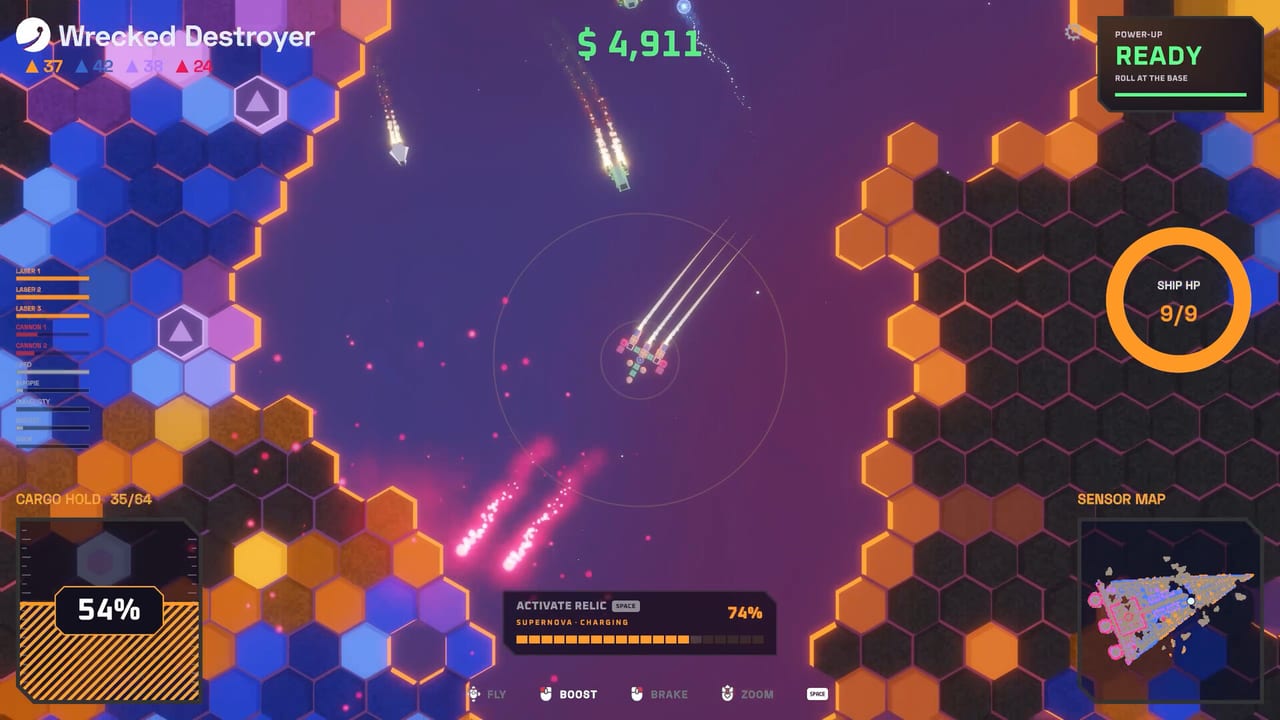
Graveyard Orbit puts you on the Orbitron Corporation cleanup roster. Galactic conflict left wrecks and megastructures drifting through the system, and your job is to break them down tile by tile, haul the ore home, and spend it on a better ship. SUNNY, the company PR bot, keeps the tone cheerful while you focus on grids, weapons, and steady cash flow. This getting started guide covers the first session on Steam PC Windows so you leave the tutorial with a clear loop instead of a cluttered hull.
The game is single-player only—no multiplayer—with full controller support, Steam Achievements, and Steam Cloud. It released November 18, 2026 from Anchorhead Games at about $4.99 (often discounted). Before you dive deeper into ship building or a laser wall, lock in the basics below.
First launch checklist
- Confirm your PC meets the system requirements and bind inputs on the controls page if you prefer pad over mouse.
- Complete the opening Orbitron briefing. Treat it as a live tutorial: fly close, fire the starter mining laser, fill cargo, return, and sell.
- Open the shipyard as soon as you can afford a second weapon or a cargo expand. Placement matters more than buying every shiny part.
- Visit the Extractor early. Even a simple belt route multiplies ore value and funds departments faster than raw sales alone.
- Unlock the first research or department branch that expands lasers or power. Early power shortages stall every other upgrade.
Understanding your first contract
Contracts send you to a wreck or structure with a tile count and a cleanup goal. Smaller early sites sit near the low end of the game’s six-structure curve (about 5,000 tiles upward toward roughly 250,000 on the largest). Structures are layered. Outer shells give soft ore and practice; sealed cores and hidden threats appear deeper in. Do not rush the core on your first ship—clear lanes, keep cargo trips short, and learn how your weapons arc across the silhouette.
Ore is color-matched. Gold prefers laser work; blue prefers dynamo-style processing paths; other hues reward the tools that match them. Matching colors raises effective value before the Extractor even touches the haul. If you ignore match preferences, you will grind longer for the same upgrade money.
The ship grid in plain terms
Your hull is a grid with power, weight, and cargo budgets. Every weapon and module spends those budgets. Placement decides what you can hit: a laser on the wrong edge may never see the tiles you care about. Start with a short laser trunk, enough cargo to finish a pass without constant returns, and spare power for one upgrade branch. Avoid stacking heavy contact or gravitron toys before you understand coverage—those trees shine later.
Frame tokens and chassis evolution appear as departments and research progress. Early on, spend tokens on stability and power headroom rather than exotic silhouettes. A tidy starter frame that flies cleanly beats a sprawling chassis you cannot feed.
First-hour economy loop
Mine a slice of the wreck → fill cargo → return → run ore through the Extractor → buy one meaningful shipyard upgrade → repeat. Resist buying three mediocre parts when one stronger laser or cargo bay would shorten the next run. Departments unlock weapon trees and parts; research trees open mods that change how weapons behave; shards from wrecks fuel those mods. Relics with powerful abilities show up as you push deeper—bank them for structures that punish slow clear speeds.
For a visual of the early incremental loop and shipyard flow, the embedded overview above walks through assembling a mining rig and clearing a mid-size derelict.
What to unlock next
After your first clean contract, prioritize:
- Extra power generation so new lasers actually fire
- Cargo capacity so trips stop interrupting DPS uptime
- The next laser or rapid-beam branch if you enjoy the laser wall path
- Extractor belt or smelter upgrades that raise ore multipliers
- Research that turns shards into meaningful weapon mods
Then read the full mining guide for layered structures and sealed cores, and skim the tier list plus weapons tier list before committing hard to cannons, pulse, drones, contact, or gravitron. When the campaign feels solved, graduate to Overtime Mode for bigger one-shot contracts, stars, or Executive Privileges.
Common early mistakes
- Spreading weapons across every tree instead of specializing coverage
- Ignoring color-match ore and selling raw without Extractor passes
- Overweight builds that cannot reach sealed cores efficiently
- Skipping department unlocks that gate better parts
- Forgetting to check updates after a patch changes mod costs or structure HP
Bookmark official links for the Steam page and community hubs, keep this wiki open beside the shipyard, and treat every failed layout as cheap research. Once the first-hour loop feels automatic, you are ready for deeper ship theory and megastructure clears.
Frequently Asked Questions
Quick answers about mining, ships, and progression.
Is Graveyard Orbit free to play?
No. It is a paid Steam PC title from Anchorhead Games, usually around $4.99 and often on sale. A demo has existed separately on Steam.
Does Graveyard Orbit support controllers?
Yes. Full controller support ships with the game alongside keyboard and mouse. See the controls page for binding tips.
What should I buy first in the shipyard?
Power and cargo first, then a second laser or beam upgrade that improves coverage. Avoid exotic trees until the basic loop is stable.
When should I start Overtime Mode?
After you understand campaign mining, Extractor value, and at least one solid ship layout. Overtime is best as a post-campaign stretch, though it is not strictly required.
Is there multiplayer or multiplayer?
No. Graveyard Orbit is single-player only.